Welcome back to the ‘Phish Tank!’🪝
In each issue of ‘Phish Tank’, we highlight real phishing attempts that have made their way into our inboxes, so you can see exactly what to watch out for. The more tricks you recognize, the less likely you are to get hooked!
If you’ve been seeing a flood of “free” Yeti coolers, Lowe’s tool sets, Sam’s Club giveaways or “your cloud storage is full” warnings lately, you’re not the only one!
The email:
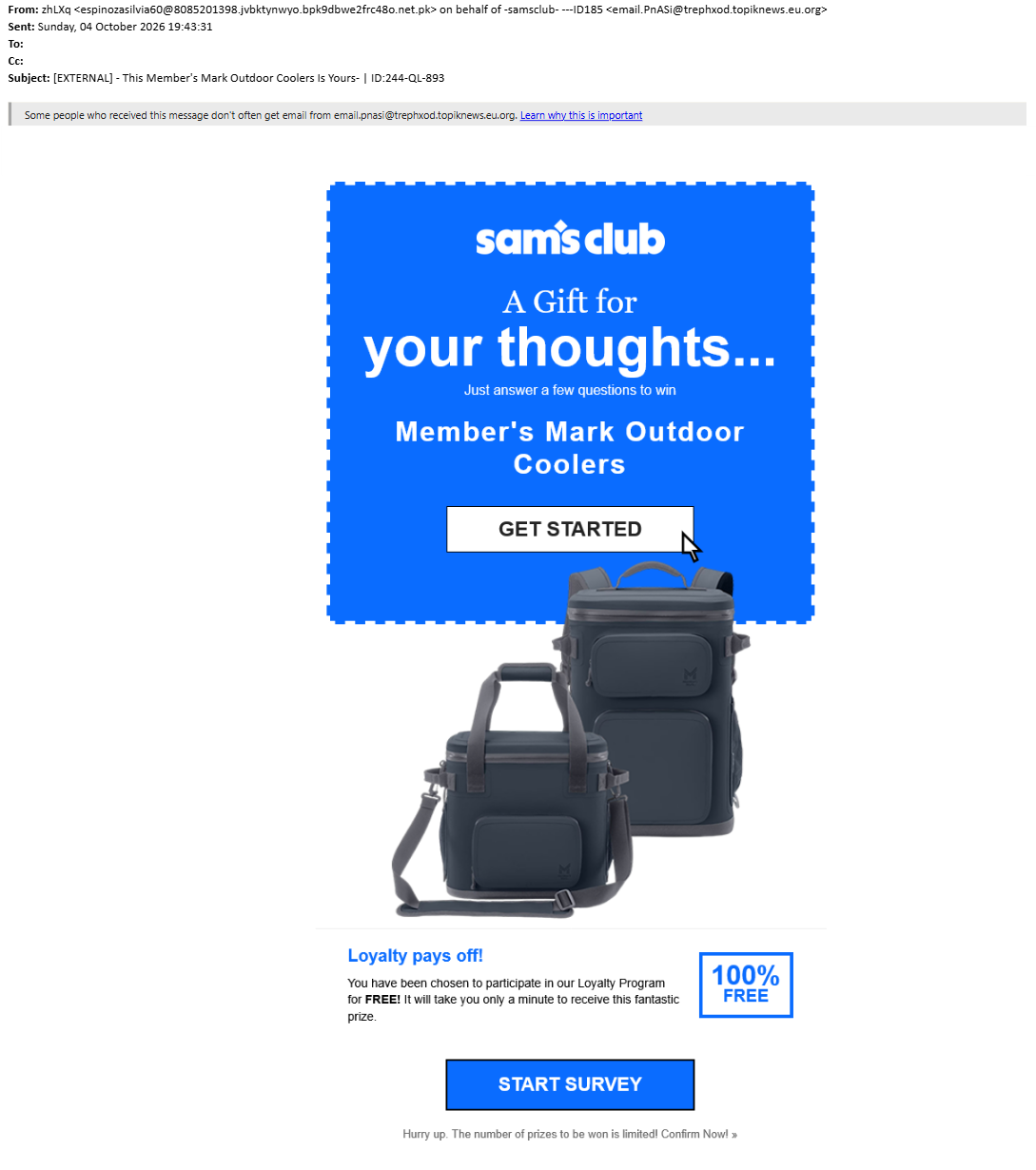
Subject: This Member's Mark Outdoor Coolers Is Yours- | ID:244-QL-893
From: -samsclub----ID185
What makes it suspicious?
🚩 A strange tag at the end of the subject - Almost every one of these emails ends with something like | ID:244-QL-893. Real companies don’t tack random codes onto their subject lines. The scammers do it so spam filters can’t easily match one copy to the next.
🚩 A sender name that doesn’t match the address - The name says “samsclub,” but the actual email address is a random string at a website that has nothing to do with Sam’s Club.
🚩 A prize you never signed up for - “You’ve been selected” for a free cooler, tool set, or speaker. If you didn’t enter a contest, you didn’t win one.
🚩 The whole email is one big picture - There’s no real text, just an image with a button. Scammers do this so filters have less to read. Hover over the image and the link goes to a website that isn’t the store it claims to be.
🚩 The External banner - Even when an email looks polished, the banner at the top tells you it came from outside CNUSD. That’s your cue to slow down.
Attack Deep-Dive: FoxWhoops is back
You might remember FoxWhoops from Phish Tank #2: fake online stores that promise a reward for completing a survey, then ask for your credit card to pay a small “shipping” or “discount” price. The prize never shows up. Your card number goes straight to the scammers.
The same scam is back, with a few new tricks to sneak past email security:
- It’s sent through Microsoft’s own email servers. The scammers set up their own Microsoft accounts and relay their emails through them. To an email filter, the message looks like it came from a legitimate business.
- The links are disguised. The web addresses are scrambled in a way your browser can still open but many security scanners skip right over.
- The website hides from security tools. When a scanner visits the link, it gets sent to a harmless news page. Real people get the phishing page.
That’s why some of these emails make it into your inbox, and why you are such an important part of catching them.
What do I do if I receive an email like this?
- Don’t click the image or any links.
- Report it using Chip, the CyberNut Report Button, in your email. Your report may even end up in a future Phish Tank!
- Don’t forward it to coworkers to warn them. Forwarded copies still have working links. Reporting it lets us remove it from everyone’s inbox at once.
What if I already clicked?
Don’t panic. These emails are professionally designed to fool people, and there’s no judgment here.
- If you only clicked and didn’t type anything in, close the page and report the email.
- If you entered credit card details, call your bank or card company right away and tell them the card may be compromised.
- If you entered your district username or password, contact I.T. right away at (951) 736-5190 or submit an incident report.